
To manage pest traps properly, each trap needs a fixed identity, a check date and a record of catches and lure changes. A QR label stuck on the trap solves this: by scanning it with your phone you know which trap it is, which plot it is in, which pest it monitors and when it is due to be checked. With the Orcelis technician app you print the labels, register the trap when you scan it for the first time and record the catches during the visit.
Orcelis’s screens are in Spanish; button and menu names are shown as they appear in the app.
What traps are for
Traps are one of the monitoring tools of integrated pest management. They are used to detect the arrival of a pest, follow its development through the season and decide when to intervene. For some pests, such as fruit flies, the threshold is expressed directly in catches per trap.
It is worth distinguishing two uses: monitoring traps, few and spread out to measure the population, and mass trapping, many traps designed to reduce it. This guide deals with the former.
Most common trap types
- Delta or funnel traps with sex pheromone: attract the males of a specific species, mainly moths.
- Coloured sticky traps (yellow or blue sticky cards): attract winged aphids, whiteflies, thrips or leafhoppers by colour.
- Fly traps with attractant: for fruit flies and olive fly.
- Ground baits: for pests that live in or move through the soil.
What to record for each trap
A trap reading is only useful if it can be compared with the previous one. So for each trap you need to know:
- Where it is: holding, plot and crop.
- Which pest it monitors and with which attractant.
- When it was set and when the lure was last changed.
- The catches at each reading and the days elapsed since the previous one.
With that you calculate catches per trap per day, the figure that lets you compare readings taken at different intervals. An expired lure gives low readings that look like good news but aren’t.
Why a QR label
On a farm with dozens of traps, notebooks and numbers written in marker pen let you down: they fade, get mixed up and the readings end up being typed in by hand. A QR label gives each trap a unique code that the phone reads in a second. When you scan it, the reading is linked to that trap, with its date and history, without typing anything but the catches.
How to do it with the Orcelis technician app
Everything is under Más › Trampas y muestras (More › Traps and samples). From a crop record, «Trampas y muestras» shows only that crop’s traps.
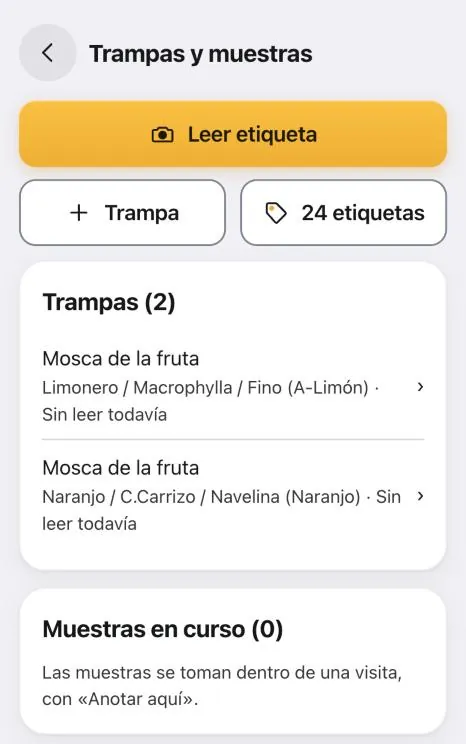
The «24 etiquetas» (24 labels) button generates an A4 PDF with 3 × 8 labels of 70 × 37 mm, the most common adhesive sheet format. The labels come out blank: they don’t belong to any trap until you scan them for the first time. Keep a sheet in the car and use them as needed. To make them last in the field, print them on synthetic adhesive paper with a laser printer: inkjet ink runs in damp conditions.
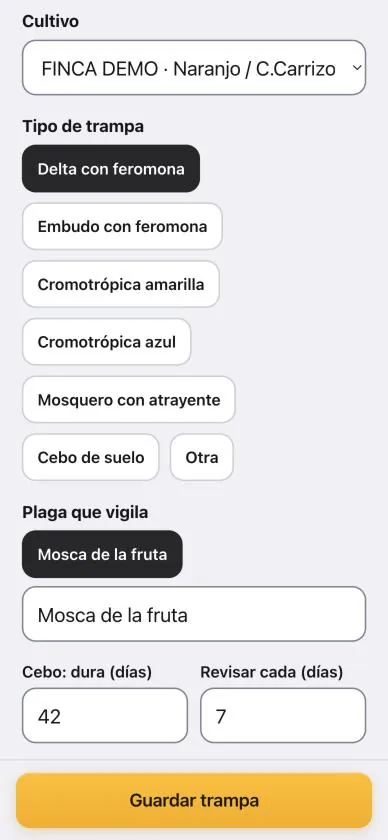
Scanning a new label opens «Nueva trampa» (new trap): Cultivo (crop), Tipo de trampa (trap type), Plaga que vigila (pest monitored), Cebo: dura (días) (lure lasts, days) and Revisar cada (días) (check every, days), which defaults to 7.
The usual way is to read traps during a visit, so the reading goes into the visit report. With no visit open, the label opens the trap record, with «Anotar lectura» (record reading), «Cebo cambiado hoy» (lure changed today), «Retirarla» (remove it) and a chart of catches per day.
Step by step
- Print the labels. In the technician app, go to Más › Trampas y muestras and tap «24 etiquetas». Print the PDF on synthetic adhesive paper with a laser printer.
- Stick the label on and scan it. Stick a label on the trap, tap «Leer etiqueta» (scan label) and point your phone at it. As it is new, the «Nueva trampa» registration form opens.
- Complete the trap details. Choose the crop (suggested by GPS), the trap type and the pest it monitors. Check the lure duration and how many days between checks, and tap «Guardar trampa» (save trap).
- Record the catches during the visit. With a visit open, use «Anotar aquí» › «Leer etiqueta» (record here › scan label) and enter the catches. The app calculates the days since the last reading.
- Record the lure change. If you change the lure or pheromone, tick «He cambiado el cebo» (I changed the lure) when saving the reading.
- Check the alerts. In the list of traps and in Hoy (today), the «Leer» (read) and «Cebo» (lure) alerts tell you which traps have an overdue reading or an expired lure.
If something goes wrong
- It won’t scan the label: clean it or move closer. With «¿No la lee? Otras formas» (won’t scan? other ways) you can take a photo of the label or type the code printed next to the QR.
- «Ese código no es de una etiqueta de Orcelis» (that code is not from an Orcelis label): you have scanned a different QR code.
- «Por subir» (pending upload) next to a trap: you registered it with no signal; it will upload automatically.
The same labels work for laboratory samples (soil, leaf, water, fruit): during a visit, «Anotar aquí» › «Muestra» (sample) creates the bag code and tracks it until the result comes back.
Frequently asked questions
What happens if a label gets damaged?
Open the trap record in the app and tap «Imprimir esta etiqueta» (print this label). A new one comes out with the same code, so the trap keeps its full history.
Does it work without signal?
Yes. You can register traps and record readings offline. They are marked «Por subir» (pending upload) and upload automatically as soon as signal returns.
How often should the lure be changed?
It is set by the manufacturer of the dispenser or attractant, and also depends on temperature. Orcelis suggests a duration based on the trap type, but it is only a guide: adjust it to what the product label says.