
To send the irrigation schedule to the grower’s phone, the technician calculates and saves the crop’s irrigation and fertiliser prescription, and the grower receives it in an app where they see each day how long to irrigate and which fertiliser to apply. What matters is that the plan arrives day by day, not as a PDF lost among phone messages, and that the grower can confirm what they did. In Orcelis, all it takes is saving the calculation and sending the grower an access link by text message (SMS).
Orcelis’s screens are in Spanish; button and menu names are shown as they appear in the app.
Why send the plan to the phone rather than on paper
An irrigation schedule on paper or in a PDF works until something changes: it rains, a fertiliser runs out or the irrigation head breaks down. Then the technician doesn’t know what was really done and the field logbook ends up recording what was planned instead of what was applied.
- The grower only sees what’s due today: irrigation time, water and product, with no tables to interpret.
- The technician knows what was done: each day is marked as done, changed or not done, with the reason.
- The logbook fills itself in with what was actually applied.
Step by step
- Calculate the crop’s irrigation and fertiliser. Run the fertigation calculation and check the water and fertilisers for each period.
- Save the prescriptions to the schedule. Click «Guardar prescripciones» (save prescriptions). If Orcelis asks «¿Actualizar la agenda?» (update the schedule?), choose «Reemplazar» (replace): this sends the plan to the schedule and to the grower’s app.
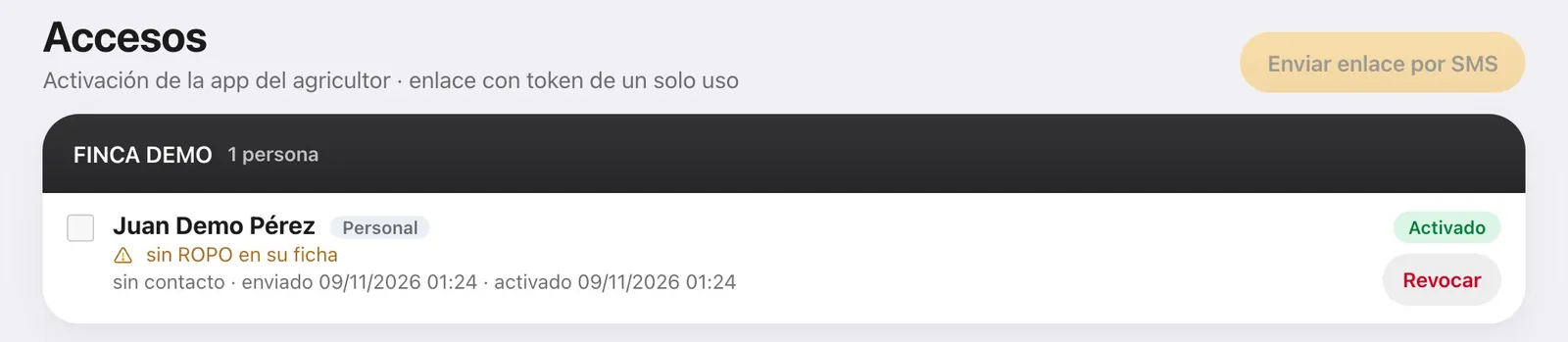
- Check that the grower is listed as farm staff. The app is used by whoever works the holding. If the owner also works it, in Accesos (access) click «Darlo de alta como personal» (add as staff).
- Send the access link. In Cartera › Accesos (app del agricultor) (Portfolio › Access, grower app), click «Enviar por SMS» (send by SMS) next to the person. If the SMS doesn’t go through, click «Copiar» (copy) and send them the link by whatever means you prefer.
- The grower activates the app. They open the link, accept the privacy notice, add Orcelis to their phone’s home screen and choose a 4-digit PIN. No username or password is needed.
- Decide how far ahead they see the plan. In the crop record, Cuaderno (logbook) tab, leave Sincronizado con la app del agricultor (synced with the grower app) switched on and set El agricultor ve (the grower sees; 1 month by default).
- Check what they see. Click «Ver como el agricultor» (view as the grower) to open their app exactly as they see it, read-only.
- Follow what they confirm. Each day the grower taps «Hecho» (done), «Cambió algo» (something changed) or «No se pudo» (couldn’t be done), and you see it in the crop’s schedule.
What the grower sees on their phone
When they open the Orcelis app, the Hoy (today) screen tells them what is due for each crop: Regar (irrigate: time and water), Abonar (fertilise: product and quantity) or Tratar por el riego (treat through the irrigation). In Mis parcelas (my plots) they have the full plan for the period: the time and water for each irrigation, how many irrigations there are, how much of each fertiliser goes in each day, and the calendar. It is what they need to program the irrigation controller.
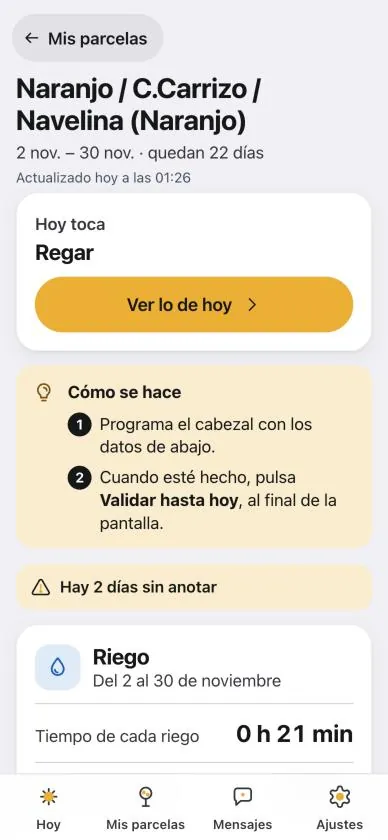
If something changed, the grower enters what they actually did (for example, how long they irrigated) and chooses the reason: «Ha llovido» (it rained), «El terreno ya estaba húmedo» (the ground was already wet), «Se acabó el producto» (ran out of product), «Avería» (breakdown) or «Otro motivo» (other reason). The technician’s plan is not deleted: both what was planned and what was done are kept. The app also works without signal and sends what was recorded as soon as it is back online.
Why it is easier with Orcelis
The same calculation the technician makes is what reaches the grower, without copying tables or sending photos of a sheet of paper. What the grower confirms goes back to the crop’s schedule and from there to the farm logbook. And if you change the plan and save it again with «Reemplazar», the grower sees the new version on their phone.
Frequently asked questions
How long is the link the grower receives valid for?
The link is valid for 7 days and can be used only once. If it expires, click «Reenviar» (resend) in Accesos to generate another. If someone stops working on the farm, click «Revocar» (revoke) to remove their access.
The grower can’t see an irrigation. Why?
The crop may not be synced with the app, the irrigation may fall beyond what they are allowed to see, or «No tocar la agenda» (don’t change the schedule) may have been chosen when saving the calculation. In that case, tick the prescription in Acciones / Operaciones and click «Pasar a la agenda» (send to schedule).
Does the grower need to download an app from the app store?
No. When they open the link, the app installs on the phone’s home screen straight from the browser, on Android and iPhone, and opens without a username or password.