
To calculate fertigation month by month you do two calculations for each period. Water: the reference evapotranspiration (ETo) for your area multiplied by the crop coefficient (Kc) for the growth stage, adjusted for canopy cover and irrigation efficiency. Fertiliser: the crop’s nutrient requirements for the expected yield, minus what the soil, the water and the base dressing already supply, split across growth stages and converted into kilos of fertiliser according to its nutrient content.
Orcelis’s screens are in Spanish; button and menu names are shown as they appear in the app.
What calculating fertigation means
Fertigation is applying fertiliser dissolved in the irrigation water. Calculating it means deciding, for each period of the season, how much water the crop needs and which fertilisers, and how much of each, go into that water. The result is a prescription: m³, number of irrigations, irrigation time per day and kilos of each product.
Doing it month by month (or fortnightly, or weekly) makes sense because the crop does not use the same amount all year round: water demand follows the weather and the growth stage, and nutrient demand is concentrated in the growth, flowering, fruit set and fruit sizing stages.
How the water for each period is calculated
The reference method is the FAO one (FAO-56 publication): crop water use is ETc = Kc × ETo.
- ETo (reference evapotranspiration): the water demand of your area’s climate in that period, in mm/day.
- Kc (crop coefficient): how much your crop uses relative to that reference at each stage. It is low at the start, peaks mid-season and falls at the end.
- Canopy cover: in drip-irrigated woody crops, a small tree at wide spacing uses less water than the same spacing fully covered. That is why canopy size and planting spacing matter.
- Irrigation efficiency and leaching: on top of the water the crop uses, you add what is lost and, with saline water, a leaching fraction.
To convert to volume, remember that 1 mm equals 10 m³/ha. Example: with an ETo of 5 mm/day and a Kc of 0.6, the crop uses 3 mm/day, that is, 30 m³/ha per day. The irrigation time comes from dividing that volume by the installed flow rate (number of drippers per hectare × flow rate of each dripper) and spreading it across the week’s irrigations.
How the fertiliser for each period is calculated
- Season requirements in fertiliser units (kg/ha of nutrient, shown in the app as UF/ha) of N, P₂O₅, K₂O, CaO and MgO for the yield you expect.
- Deductions: what the soil already supplies (according to its analysis), the irrigation water if it carries nutrients, the base dressing and organic matter.
- Efficiency: part of the fertiliser is lost through leaching, so slightly more is applied than the crop removes.
- Split by stage: each stage receives a percentage of each nutrient, and that percentage is spread across the days of the period.
- Conversion to product: kg of fertiliser = units ÷ nutrient content (%) × 100. For example, 10 units of N with a fertiliser containing 33.5% N is about 30 kg of product.
| Input | Where it comes from | What it is for |
|---|---|---|
| ETo | Local climate | Water demand for the period |
| Kc per stage | Reference tables adjusted to your crop | Converting ETo into crop water use |
| Canopy and spacing | Field measurement | Adjusting water for cover |
| Reference units/ha | Expected yield and nutrient removal | Nutrient requirements |
| Soil, water and leaf analyses | Laboratory | Deducting supplies and correcting deficiencies |
| Fertiliser nutrient content | Product label | Converting units into kg of fertiliser |
How to do it with Orcelis
Doing these calculations by hand for every crop and every month is slow and error-prone. Orcelis stores each crop’s growth stages, Kc values, canopy, spacing and reference fertiliser units, takes into account the linked analyses and the water from its source, and calculates irrigation and fertiliser for one or many crops in one go.
Step by step
- Check the crop data. Make sure the crop has a variety, planting spacing and canopy size. If you have soil, leaf or water analyses, link them to the crop or to its water source.
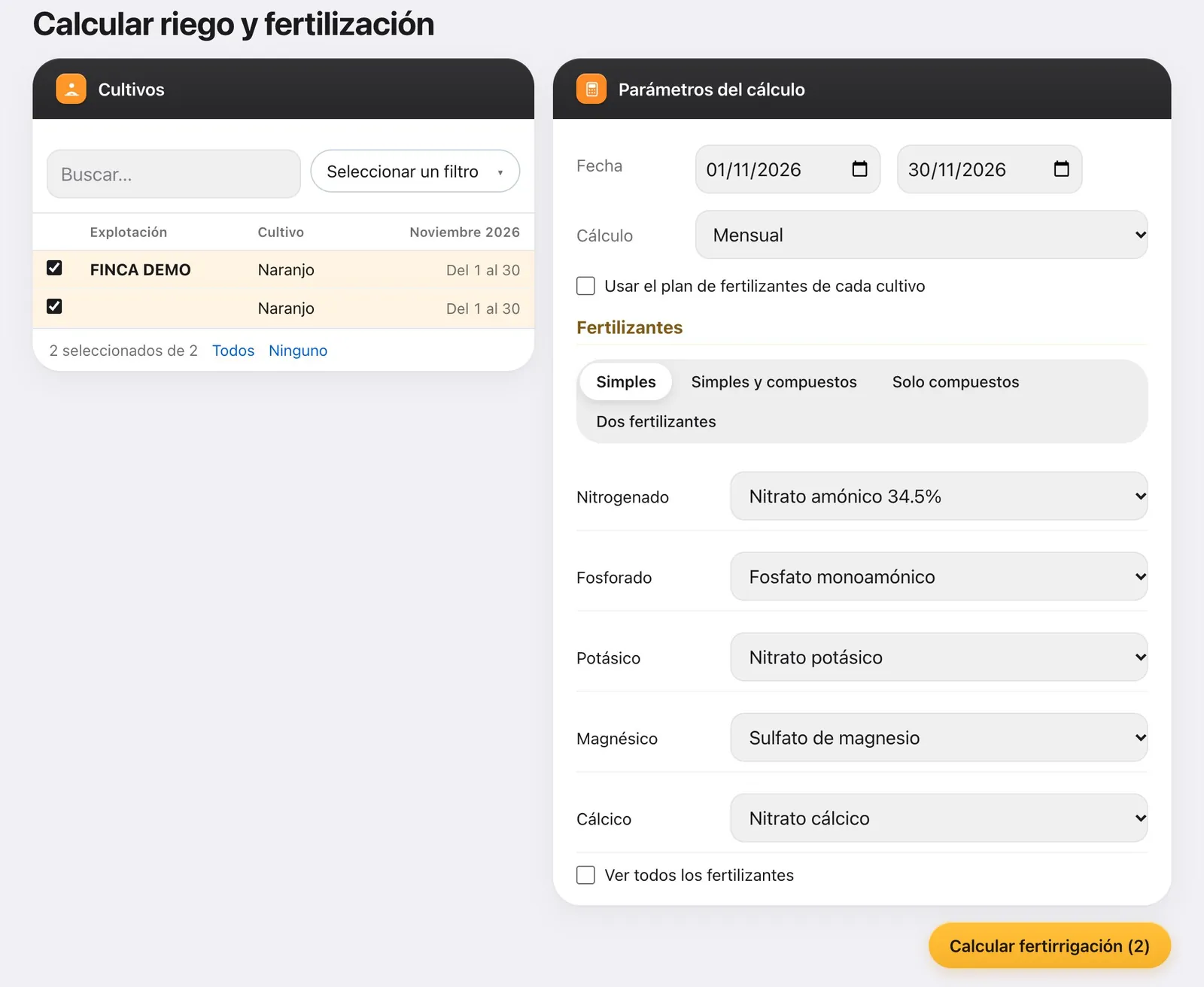
- Open the calculation and choose the crops. In the menu, go to Fertirrigación › Calcular fertirrigación (Fertigation › Calculate fertigation), or click «Calcular» in the crop record. In the Cultivos (Crops) panel, tick one or more.
- Set the period. In Parámetros del cálculo (calculation parameters), enter the from and to dates, and under Cálculo choose Mensual, Quincenal or Semanal (monthly, fortnightly or weekly).
- Choose the fertilisers. Tick «Usar el plan de fertilizantes de cada cultivo» (use each crop’s fertiliser plan) or choose a strategy (Simples, Simples y compuestos, Solo compuestos or Dos fertilizantes: straight, straight and compound, compound only, or two fertilisers) and one product per nutrient. Then click «Calcular fertirrigación».
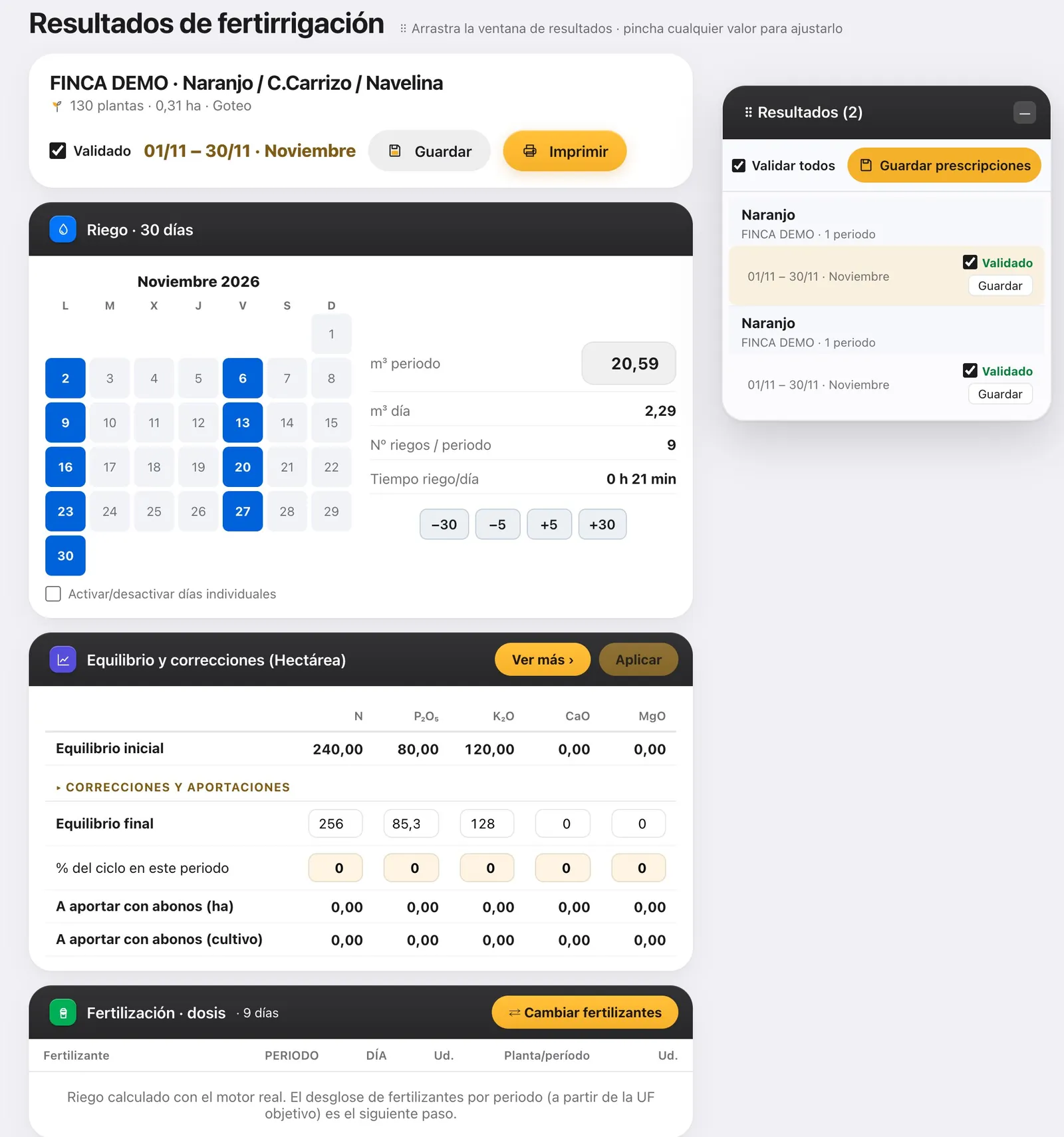
- Review each period. In the «Resultados» (Results) window, click each period to see the m³, the number of irrigations and the irrigation time per day. Adjust the time with −30, −5, +5 and +30 minutes or change the fertiliser with «⇄ Cambiar fertilizantes».
- Save the prescriptions. Click «Guardar prescripciones» (save prescriptions) and, if asked «¿Actualizar la agenda?» (update the schedule?), choose «Reemplazar» (replace). This sends the calculation to the crop’s schedule, the field logbook and the grower’s app.
Once saved, the result is no longer just a spreadsheet: in Orcelis it becomes the crop’s prescription, which you will see in the Acciones / Operaciones (actions / operations) tab of its record, and in the day-by-day schedule in the Cuaderno (logbook) tab, which is what the grower sees on their phone.
Common mistakes
- The water looks too low or too high: first check the crop’s canopy and spacing, then the Kc values for each stage.
- An analysis is not being taken into account: it must be linked to the crop (or to its water source) and dated on or before the start of the period.
- Printing is not saving: «Imprimir» (print) gives you the result on paper, but the grower only receives it if you click «Guardar prescripciones».
- You chose «No tocar la agenda» (don’t change the schedule): the prescription is saved but does not reach the logbook. In the crop record, tick the prescription and click «Pasar a la agenda» (send to schedule).
Frequently asked questions
How many m³ per hectare is 1 mm of irrigation?
1 mm of water over one hectare is 10 m³. So a water use of 4 mm/day equals 40 m³/ha per day, before adding the efficiency losses of the irrigation system.
Is it better to calculate monthly, fortnightly or weekly?
A monthly calculation is enough to plan the season. Fortnightly or weekly calculations track changes in growth stage and weather more closely, and are preferable for short-cycle crops or in the months of peak demand.
Why does the calculated water change from one year to the next for the same tree?
Because the calculation depends on canopy size and on the Kc for each stage. If the tree has grown, or if you have changed the Kc values or the length of the stages, the result changes even though the farm is the same.