
A plant protection prescription (in Spain, «receta fitosanitaria») is the document in which the adviser states which product to apply, at what dose, on which crop and plots, against which pest and why. To write one, confirm the pest in the field, choose a product authorised for that crop and that pest in the official register, set the dose and spray volume, check the pre-harvest interval, define the plots and sign it. In Orcelis the prescription is filled in from the MAPA register (Spain’s Ministry of Agriculture) already filtered by crop, and it comes out ready to print or save as a PDF.
Orcelis’s screens are in Spanish; button and menu names are shown as they appear in the app.
What a plant protection prescription is
The plant protection prescription is the written recommendation for a treatment. It records what is applied, where, how much and why. It is the proof that the treatment responds to a real problem and that the product is authorised for that use.
In Spain, the framework is Royal Decree 1311/2012, which transposes European Directive 2009/128/EC on the sustainable use of pesticides. It makes integrated pest management mandatory and regulates plant protection advice. The specific requirements for the prescription under Spanish law can vary by autonomous community and production system (integrated, organic, customer protocols), so check the ones that apply to you.
What it must include
A complete prescription includes, at a minimum:
- Holding and crop: holder, species and variety, and the plots or SIGPAC enclosures (Spain’s Land Parcel Identification System) being treated.
- Problem: the pest, disease or weed, with the crop’s growth stage (BBCH) and the justification for intervening.
- Product: trade name, registration number and active substance.
- Dose and spray volume: dose per hectare or concentration, spray volume (l/ha) and total quantity for the area.
- Pre-harvest interval: the number of days that must pass before harvest.
- Means: application equipment and operator.
- Signatures: the adviser’s (with their ROPO number, Spain’s official register of plant protection professionals) and the grower’s or operator’s.
Before prescribing: three checks
- That treatment is needed. Sample and compare against the pest’s threshold. If it is not exceeded, the best prescription is not to treat.
- That the product is authorised for that use. It is not enough for it to be authorised on the crop: it must be authorised for that pest, at that dose and with that number of applications.
- That the pre-harvest interval doesn’t clash with harvest. If picking is close, choose another product or delay the harvest.
How to do it with Orcelis
In Orcelis, the Tratamiento fitosanitario (plant protection treatment) screen opens from Fitosanitarios › Receta (Plant protection › Prescription), from a crop record (Acciones / Operaciones › Nuevo tratamiento, new treatment) or from a holding. On the left you choose the crops; on the right, the treatment.
Clicking «+ Nuevo producto» (new product) opens the search for the Registro Oficial de Productos Fitosanitarios (Spain’s Official Register of Plant Protection Products). You can search by pest (type the pest and choose from the products authorised for it) or search by product (name, active substance, registration number or common name). The Productos table shows each one’s registration number, dose and pre-harvest interval (P.S.).
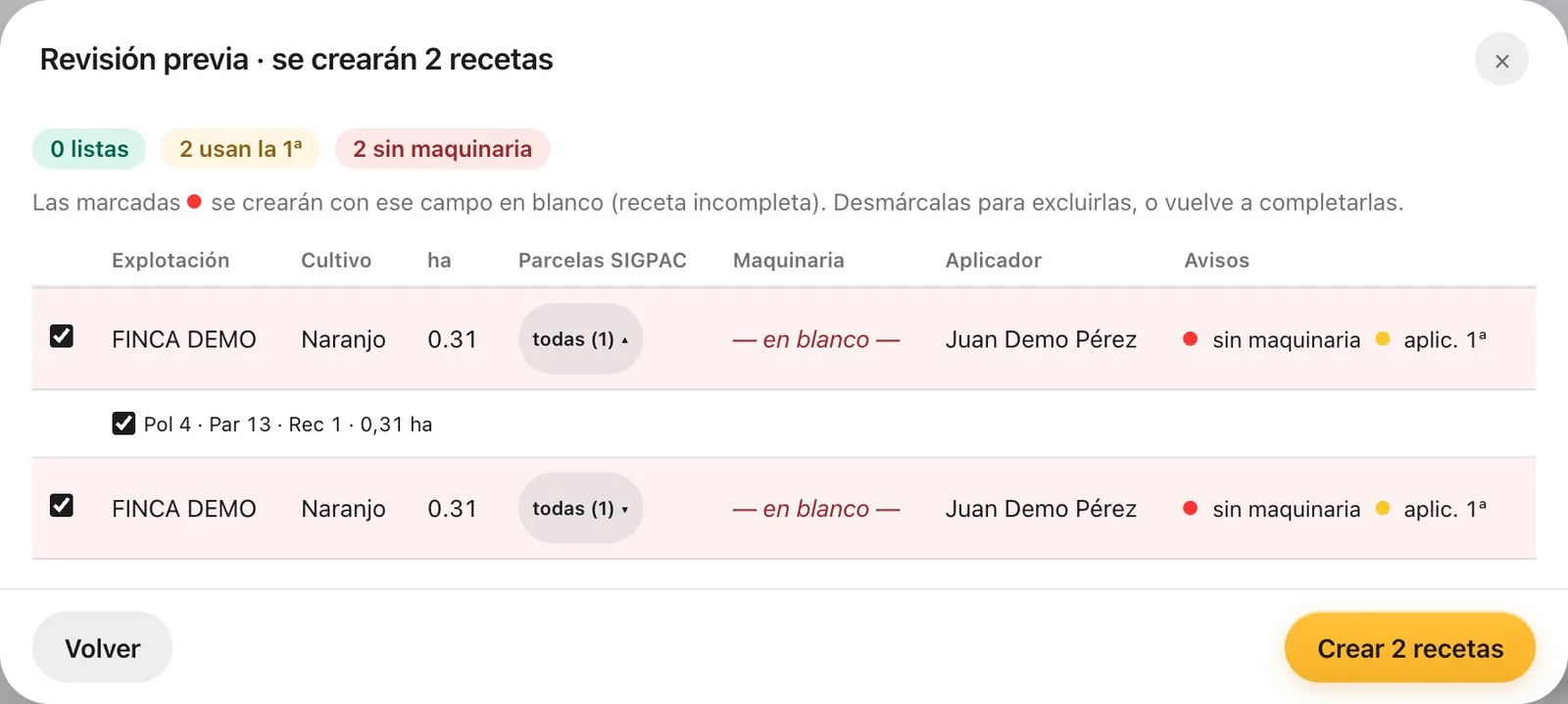
Before creating it, the Revisión previa (preliminary review) shows one row per crop with its area, its SIGPAC plots, the equipment, the operator and the warnings. If you are only treating part of the farm, untick the enclosures you don’t need: the area and quantities drop proportionally.
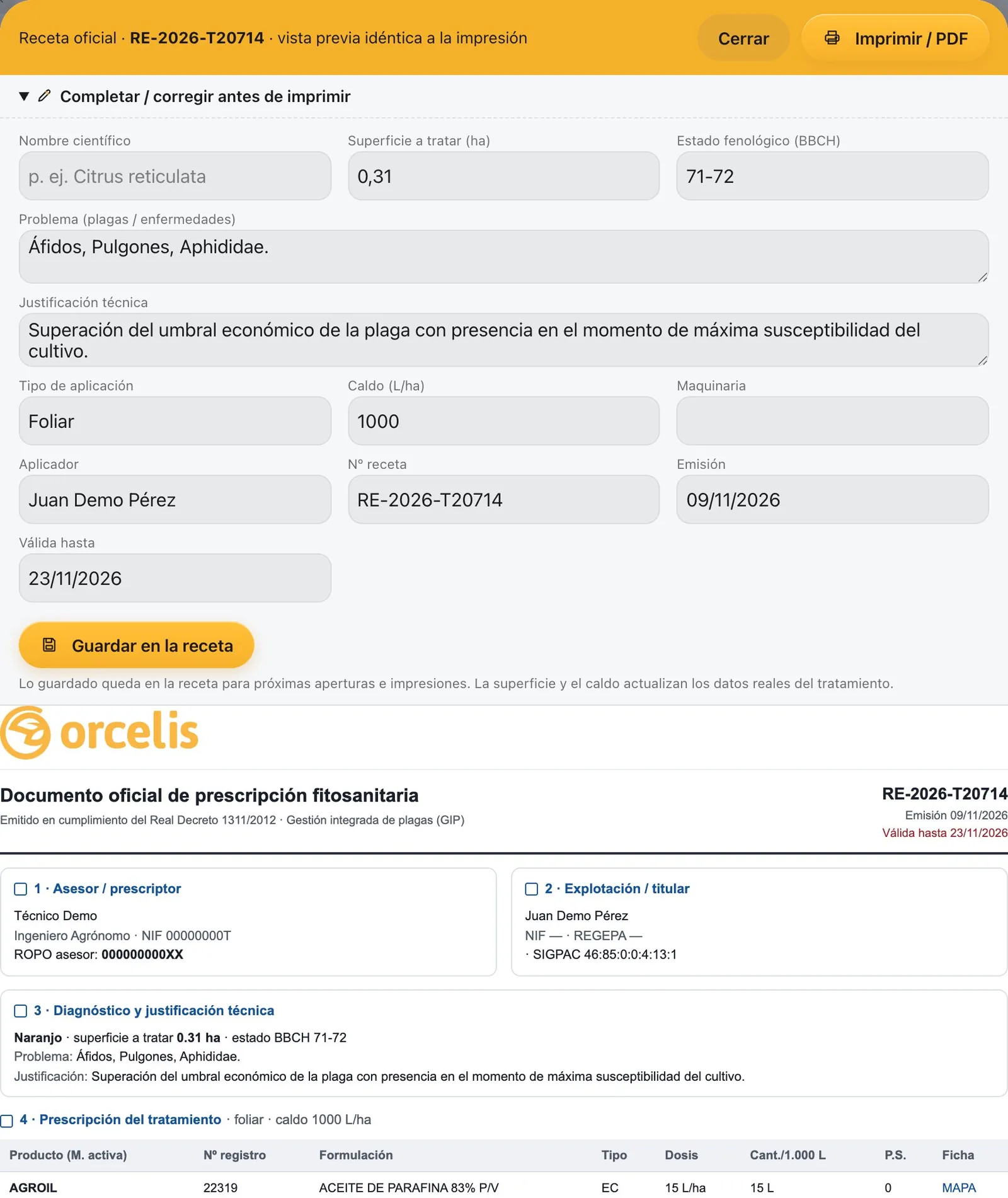
Prescriptions are saved when they are created. From the crop’s Cuaderno (logbook) tab you open the Receta oficial (official prescription), with a preview identical to the printed version. In «Completar / corregir antes de imprimir» (complete / correct before printing) you fill in anything missing (scientific name, BBCH, prescription number, dates) and print it with «Imprimir / PDF». If you have uploaded your scanned signature in your account, it is added automatically.
Step by step
- Justify the treatment. Confirm the pest or disease in the field and that its level justifies intervening. Record the crop’s growth stage (BBCH scale).
- Choose the crops. Go to Fitosanitarios › Receta, tick the crops you are going to treat and click their type under CULTIVOS: to see the authorised products.
- Fill in the treatment details. Type the description and choose the type (foliar or soil), the date and the spray volume in l/ha. The justification is written automatically and you can edit it.
- Add authorised products. Click «+ Nuevo producto», search by pest or by product, tick the uses you are going to apply and check the dose per hectare.
- Define the SIGPAC plots. Click «Crear N recetas» (create N prescriptions). In the Revisión previa, untick the enclosures that are not being treated and check the equipment and the operator.
- Review, sign and print. Check the pre-harvest interval, complete any missing official details and click «Imprimir / PDF» to print it with the adviser’s and operator’s signatures.
Why it is easier this way
- You only see products authorised for the crop you are treating, with their uses, doses and intervals.
- One prescription per crop, with its own area and spray volume, even though you prepare the treatment only once.
- The SIGPAC plots, equipment and operator come from the holding.
- The treatment goes into the crop’s schedule and the grower’s app, so they see what they have to apply.
Common mistakes
- Prescribing a product authorised on the crop but not for that pest.
- Exceeding the maximum authorised dose or number of applications per season.
- Forgetting the pre-harvest interval when harvest is close.
- Leaving the prescription without plots, equipment or operator: the document is incomplete.
Frequently asked questions
Who signs a plant protection prescription?
It is signed by the adviser who recommends the treatment, and it usually also carries the signature of the grower or the operator who carries it out. In Spain, the adviser must be listed in the Official Register of Producers and Operators of plant protection means (ROPO).
Can I treat several crops with a single prescription?
You can prepare the treatment once for several crops, but each crop needs its own prescription, with its own area and spray volume. Orcelis does this automatically: it creates one prescription per crop and, if you mix species, only offers products authorised for all of them.
What is the pre-harvest interval?
It is the minimum number of days that must pass between the last application of a product and harvest. It is set in the register for each authorised use and ensures the produce does not exceed maximum residue levels.
Can I write the prescription in the field on my phone?
Yes. With the Orcelis technician app you turn a pest recorded during the visit into a prescription, with the products authorised for that crop and their pre-harvest interval. The official document is then printed from the computer.